Many WhatsApp and Telegram numbers in one dashboard
Connect your WhatsApp and Telegram sales, support, and client lines in one place. When someone else must reply on a number, share that session to their Google email: view only, or view and send. From €5 per account, with a 7-day free trial.
See how many numbers sit in one dashboard · Run several WhatsApp Web accounts together · An inbox without the Business API
From €5 per WhatsApp or Telegram account / month · AI chatbot included

What is Chato.pro?
Chato.pro is a web-based WhatsApp and Telegram inbox. One person can connect many WhatsApp and Telegram numbers in one dashboard. The owner can share a session with another person's Google email, as view-only or view-and-send. Connecting a WhatsApp or Telegram number uses a QR code (or phone login code for Telegram) from your mobile app, and Google Workspace users can also connect Google Chat via Google OAuth to read and reply to spaces and direct messages in the same inbox. Chato.pro is not the Meta Cloud API or official WhatsApp Business API.
What problem does it solve?
WhatsApp and Telegram are built around one phone and one person. Businesses need either many numbers (sales, support, clients, locations) or several people on one number. Chato puts your WhatsApp and Telegram numbers in one browser dashboard. The owner can share any session to a colleague's Google email, view-only or view-and-send.
Who is Chato.pro for?
Support teams that share customer WhatsApp and Telegram lines, agencies and property managers who run a number per client or building, and sales or multi-location businesses that need separate lines or a shared store number.
How much does it cost?
The Standard plan is €5 per WhatsApp or Telegram account per month, or €48 per account per year. The AI chatbot is included. 7-day free trial, no credit card, 1 session included, plus free native Chato Network chat. Features, How it works, Use cases, Pricing, FAQ.
Two ways Chato works for you
Run every WhatsApp and Telegram line from one login — or let your whole team work the same number together.
One person, many WhatsApp & Telegram numbers
Monitor sales, support, and agent lines across WhatsApp and Telegram from one login. Add as many numbers as you need and handle them without switching phones.
Multi-number WhatsApp & Telegram dashboard
Many people, one shared number
Share a WhatsApp or Telegram session to a teammate's Google email. They can view the chats, or view and send. Revoke access when they should stop. Customers still message one number.
Shared WhatsApp & Telegram inbox for teams
Built for teams that live on WhatsApp & Telegram
Share one customer number across the team — or run a separate WhatsApp and Telegram line for every client, store, and agent.
Customer support teams
The problem: The business WhatsApp or Telegram number lives on one phone, so only whoever is holding it can reply.
How Chato helps: Share that number's session with the people who cover it. They reply from their own Google login. The customer still messages one line, and the team stops passing a phone around.
Shared WhatsApp & Telegram number for support
Agencies & property managers
The problem: Each client or building needs its own WhatsApp or Telegram number, but staff cannot live in ten apps.
How Chato helps: Connect client and property WhatsApp and Telegram numbers side by side. One person — or one shared login — runs every line from a single dashboard.
Multi-account WhatsApp & Telegram for agencies
Sales & multi-location businesses
The problem: Some teams need a separate line per rep or store. Others share one store number across the floor.
How Chato helps: Use both models in one product: connect many WhatsApp and Telegram numbers when lines should stay separate, or let several people work the same number together.
WhatsApp & Telegram for sales and multi-location teams
Built for how your team actually uses WhatsApp & Telegram
Many numbers for one person. One number for many people. AI, analytics, and an API on top — without stitching together separate tools.
Multiple WhatsApp Numbers
One login, every sales, support, and agent line. Connect as many WhatsApp numbers as you need and manage them from one dashboard.
See how many numbers sit in one dashboardTelegram & Google Chat in the Same Inbox
Connect personal Telegram accounts via QR/login code and Google Workspace Google Chat accounts via OAuth alongside your WhatsApp numbers — with AI chatbot and team sharing support.
Shared Number for the Whole Team
Share a WhatsApp or Telegram session to a Google email with view-only or view-and-send access. The customer still sees one line. You are not billed per person.
Per-Account AI Chatbot
Train an AI chatbot for each WhatsApp or Telegram account to answer common questions 24/7 — included in the Standard plan, not an expensive add-on.
Team Workspace
Everyone who is signed in sees the same conversations and can reply. No passing the phone. No missed chats because someone was offline.
External API
Send messages from external systems into your session chats. Each source appears as its own chat thread and is shown separately from customer messages.
See the APIAnalytics Dashboard
See message volume, response times, and engagement across all connected WhatsApp and Telegram accounts in one analytics view.
Unified Contact List
People who message any of your connected WhatsApp or Telegram numbers appear in one contact list. Search by name, phone, or tag.
Secure & Private
Encrypted connections and secure session storage. We never sell your chat data — disconnect any number whenever you want.
Inside the dashboard
Connected WhatsApp & Telegram numbers, one screen
Inbox, contacts, and reports for every WhatsApp and Telegram number you have linked — without switching phones or browser tabs.
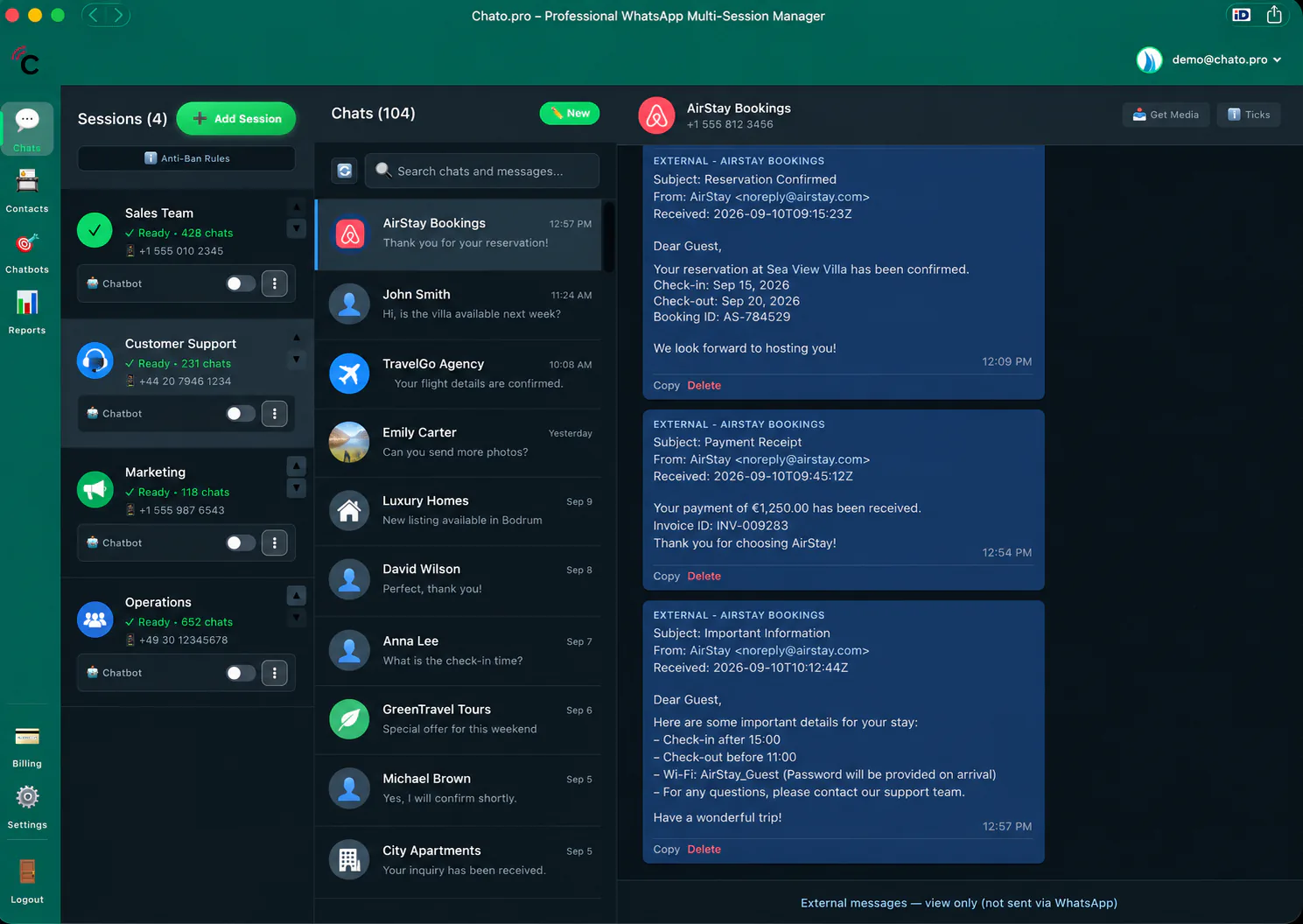
The left sidebar is every WhatsApp number you have linked. Click one to open its chats — or let that number’s chatbot handle the routine replies.
Connected WhatsApp numbers
Sales, support, marketing, and operations each sit as their own linked number on the left, with its own chatbot toggle.
Switch numbers, not phones
Pick a connected number and its conversations open in the same window. No second phone, no extra WhatsApp Web tab.
External systems stay separate
Booking confirmations and receipts land in their own view-only thread — not mixed into what you send on WhatsApp.
AI chatbot included
Automate WhatsApp & Telegram replies without an AI add-on
Train a custom AI chatbot per WhatsApp or Telegram account, upload your knowledge base, and let Chato answer common questions instantly — day or night. AI is part of the Standard plan at €5 per account, so you are not paying a separate chatbot fee on top of your inbox.
- ✓Per-account WhatsApp & Telegram AI chatbot — different scripts for support, sales, or each client
- ✓Knowledge upload for accurate, on-brand instant answers
- ✓Included in Standard — no add-on fee for AI automation
Get Started in 3 Easy Steps
Connect WhatsApp and Telegram numbers in minutes. No desktop install, no Business API paperwork to start.
Sign Up
Create your free account with Google sign-in. No credit card required for the 7-day trial.
Connect WhatsApp & Telegram
Scan the QR code with your WhatsApp or Telegram mobile app (or enter a phone code). Connect one number — or add several sales, support, and agent lines.
Share the login, start replying
Share a session to a teammate's Google email so they can view it or reply. Turn on AI for numbers that need coverage when nobody is at the desk.
Frequently Asked Questions
WhatsApp & Telegram numbers, shared sessions, AI, pricing, and security
What is Chato.pro?
Chato.pro is a web-based WhatsApp inbox. You connect each WhatsApp number by scanning a QR code with the WhatsApp mobile app (similar to WhatsApp Web), then read and reply from a browser dashboard. It is not the Meta Cloud API / official WhatsApp Business API.
What problem does Chato.pro solve?
WhatsApp is built around one phone and one person. Businesses need either many numbers (sales, support, clients, locations) or several people on one number. Chato puts those numbers in one dashboard. The owner can share a session to a colleague's Google email with view-only or view-and-send access.
Who is Chato.pro for?
Support teams that share one customer WhatsApp line, agencies and property managers who run a number per client or building, and sales or multi-location businesses that need separate lines or a shared store number. Anyone who currently juggles phones or WhatsApp Web tabs.
Can I manage multiple WhatsApp accounts?
Yes. One person can connect as many WhatsApp numbers as they need — sales, support, agents, clients, locations — and run them from one Chato dashboard. Switch lines without juggling phones or WhatsApp Web tabs.
Can several people use the same WhatsApp number?
Yes. The owner shares that WhatsApp session to a colleague's Google email and chooses view-only or view-and-send. It is not per-chat assignment. Anyone with send access can reply on that session. The customer still writes to a single line.
Can agencies manage client WhatsApp numbers?
Yes. Agencies and property managers often connect a separate WhatsApp number per client or building and run them from one Chato dashboard — useful when one person or one login manages many WhatsApp Business numbers.
How much does Chato.pro cost?
The Standard plan is €5 per WhatsApp account per month, or €48 per account per year (20% off). The AI chatbot is included. A 7-day free trial needs no credit card and includes 1 WhatsApp session. Extra numbers are added after you subscribe.
Is the AI chatbot included in the €5 plan?
Yes. The Standard plan includes a per-account AI chatbot — train replies, upload knowledge, and automate common questions. There is no separate AI add-on fee.
Do I need to install desktop software?
No. Chato.pro works in a modern browser. Sign in, scan the QR code with WhatsApp on your phone, and you are connected.
How does connecting a WhatsApp number work?
After you sign in, Chato shows a QR code. Open WhatsApp on the phone for that number, use Linked devices (or the equivalent WhatsApp Web flow), and scan. That number then appears as a session in your dashboard. Keep the phone online as you would for WhatsApp Web.
Is my data secure?
Connections are encrypted in transit and session data is stored so you can reconnect. Chato does not sell your WhatsApp messages for advertising. You choose which numbers to connect and can disconnect a session anytime. Conversations and dashboards are behind login and are not listed in the public sitemap.
How does the free trial work?
Start with a 7-day free trial. No credit card required. You get 1 WhatsApp session during the trial. Subscribe anytime to keep the number and add more accounts at €5 each per month.
What is the External API?
Chato’s External API lets you send messages from external systems into your session chats. Each source appears as its own chat thread, separate from WhatsApp messages — so CRM alerts, website forms, or internal tools stay organized next to the WhatsApp inbox. It does not send WhatsApp messages. Endpoints, fields, and a request example: https://chato.pro/external-api.
Ready to run many WhatsApp & Telegram numbers — or share one with your team?
Connect in minutes via QR or phone code. Manage every WhatsApp and Telegram line from one login, or let several people work the same number together. AI included — from €5 per account.
✓ Connect WhatsApp & Telegram in minutes • ✓ AI chatbot included • ✓ Cancel anytime
